About Passenger Airplane: Flight 3D
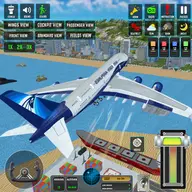
Passenger Airplane: Flight 3D is a three-dimensional flight simulation built around piloting a passenger aircraft. You can fly routes across a world map or practice essential flying skills in the training mode.
The cockpit and several outside viewpoints let you observe the aircraft from different perspectives. You can also adjust speed through the throttle and choose among sunny, rainy, and stormy conditions, creating different visual flight situations without needing to manage fuel.
How to Play Passenger Airplane: Flight 3D
Use the default joystick for smooth aircraft control.
Select arrow-key controls from Settings if that setup suits you better.
Adjust the throttle slider to control the aircraft speed.
Switch between the six available camera views while flying.
Choose World Map Mode for routes or Flight Training Mode for practice.
Tips & Tricks
- 1Use the cockpit view when precise control matters, then change to an external view to check the aircraft from outside.
- 2Keep speed adjustments gradual with the throttle rather than making abrupt changes.
- 3Training Mode is useful for becoming familiar with the joystick before attempting routes on the world map.
Game Info
- Category
- Adventure
- Platform
- Web browser
- Price
- Free
- Added
- Oct 24, 2026
- #2026 games
- #3D
- #3D Games
- #Adventure
- #airplane
- #Android
- #Best
- #Best Games
Something wrong with this game or its description?