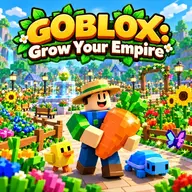
About GOBLOX: Grow Your Empire
In Sunberry Valley, you bring an abandoned garden back to life and turn its harvests into a growing farming empire. Plant seeds, collect mature crops, sell what you produce for coins, and use the proceeds to obtain unusual seeds, expand your plots, and reach additional regions. The simple farm cycle is joined by changing skies that can alter crops into more valuable forms, making each growing session a chance to discover something special.
There is plenty to collect and combine as your farm develops. The catalog includes more than 80 crops, ranging from carrots to the rare Galaxy Lotus, along with 17 possible mutation types. You can also cross two plants to create hybrids, while 48 pets provide abilities and can evolve over time. Weather effects include storms, colorful showers, falling space rocks, and glowing polar skies, each adding variety to cultivation.
How to Play GOBLOX: Grow Your Empire
Use WASD to move around the valley, and drag with the mouse to rotate your view. The mouse wheel changes the camera distance.
Press E or left click when planting, harvesting, watering, or interacting. Select seeds and tools with hotbar keys 1 through 8.
Jump with Space, run with Shift, open your inventory with Tab, and view the map with M.
Grow crops, sell the harvest for coins, then spend those coins on seeds, larger plots, and access to new regions.
Tips & Tricks
- 1Watch how the changing weather affects your plants, since unusual crop forms can be worth pursuing instead of selling immediately.
- 2Try combining different plants through Bloom Fusion when you want to search for fresh hybrids.
- 3Keep useful seeds and tools assigned to convenient hotbar positions so planting and harvesting require fewer menu changes.
Game Info
- Category
- Adventure
- Platform
- Web browser
- Price
- Free
- Added
- Oct 24, 2026
- #1 Player
- #Minecraft
- #roblox