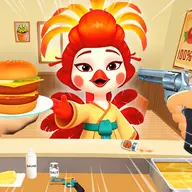
About Cooking Clash
Cooking Clash places you in a busy restaurant kitchen where customer orders arrive one after another. The game combines management decisions with an action-focused control scheme, so handling the kitchen means responding to activity while keeping your operation moving. Its animal-themed setting adds a playful touch to the cooking and restaurant context.
Instead of presenting cooking as a quiet preparation task, the game frames the work as a fast kitchen clash. On a computer, the controls use keyboard keys for switching equipment and firing, while mobile play uses an on-screen control. That unusual mix makes the main challenge feel more like managing a hectic service with direct actions than simply reading orders and waiting.
How to Play Cooking Clash
On PC, press Q to switch the weapon or tool available to you.
Press E on PC to shoot when the action calls for it.
On mobile, use the control shown on the screen to operate the game.
Work through the stream of customer orders while using the listed controls to handle the kitchen action.
Tips & Tricks
- 1Keep Q in mind when you need to change what you are using on the PC version.
- 2Reserve E for moments when shooting is required, so the keyboard controls remain easy to remember.
- 3On a touchscreen, use the displayed operating control directly rather than looking for a keyboard equivalent.
- 4Treat customer orders and your available controls as connected parts of the restaurant workflow.
Game Info
- Category
- Casual
- Platform
- Web browser
- Price
- Free
- Added
- Oct 24, 2026
- #Animal
- #Cook
- #Management
- #Restaurant
Something wrong with this game or its description?